
Does the customer see a price right away?
Only if you turn on Instant quote. Then the customer page shows an estimate for each file once it is measured, marked as an estimate. With it off, customers see no price until you send a quote.
3D Job Desk is web software for 3D print shops that measures the models customers upload, prices each part from your own rates, and lets you review and send the quote.
Quoting is where most print shops lose time. A customer emails a file. Someone opens it, guesses the print time, checks the filament price, adds labor and replies a day later. 3D Job Desk measures the file for you and puts a price in front of you. You decide what the customer sees.
When a customer uploads a model, the desk measures it: volume, size and, for supported formats, the thinnest wall. It picks the smallest printer in your catalog that fits the part, then prices the line from your own rates. The price uses what you set in Settings: • Print hourly rate and labor hourly rate • Pre-processing and post-processing minutes • Waste percent and failed-print percent • Material price and a one-time setup cost per material • A minimum charge per line and a minimum for the whole order • Bulk discount tiers by quantity • Finish multipliers • Lead time tiers based on the order total You can test your numbers on the Calculator page before any customer sees them.
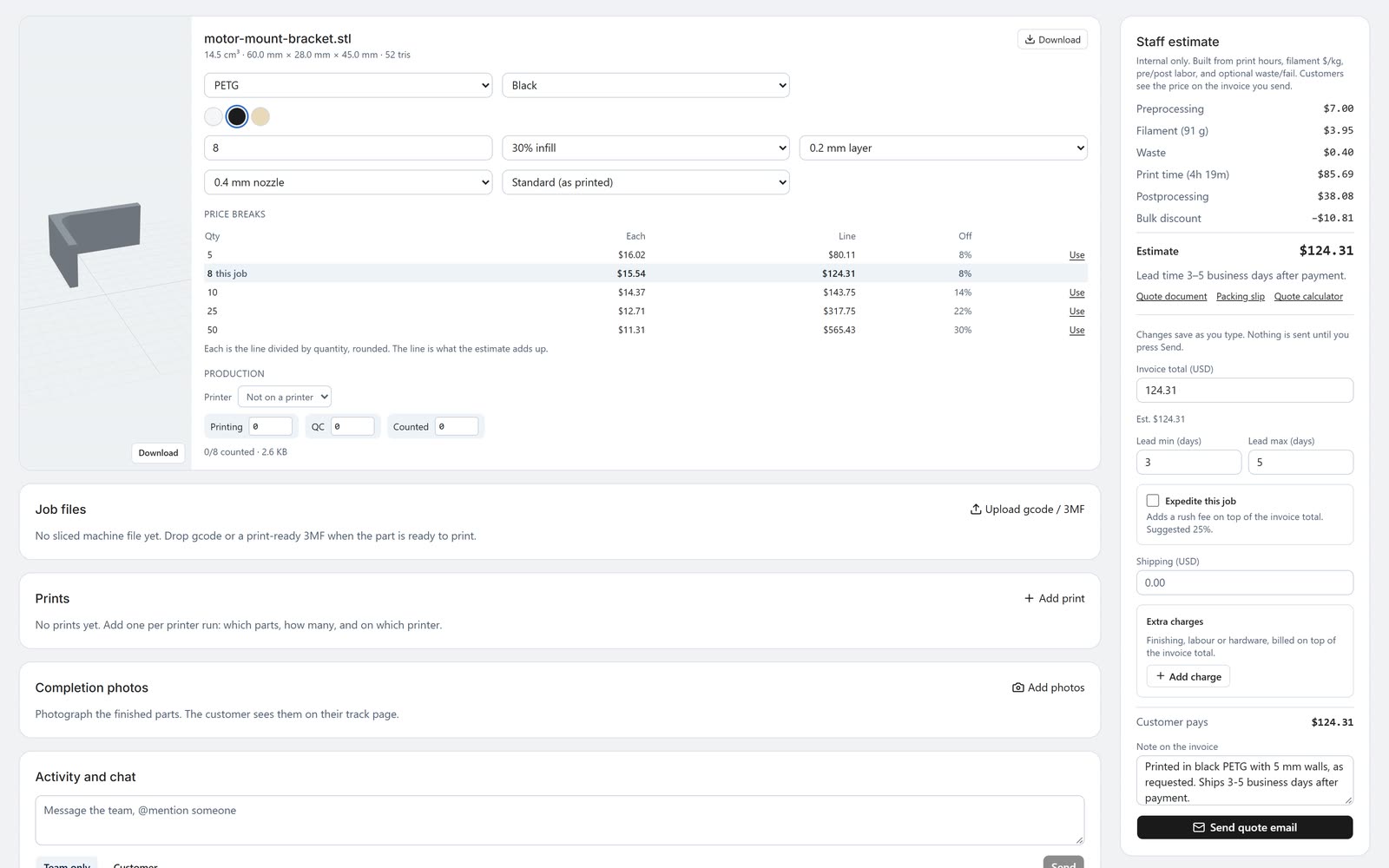
Turn on Instant quote and the customer page shows an estimated price for each file once it is measured, plus a total marked as an estimate. Leave it off and customers see no prices until you send a quote. Either way, you review and send every quote. The estimate is a starting point. You can type your own price for the whole job or for each file, and you can require a typed price before anything goes out.
Some files cannot be priced by formula. The desk says so instead of showing a wrong number: • A file it cannot measure goes to you for a manual quote. • A part too big for the printers you listed for that material goes to you. • A material you mark as "quoted by the print desk" is never auto-priced.
Finishing, hardware and labor are rarely in the print time. Add them as extra lines with a quantity and unit price. Add a rush fee (the desk can fill it as a percent of the price), a flat shipping rate, free shipping above an amount, and a sales tax rate. A client organization can carry its own tax rate. Every figure feeds one total, so the email, the quote document and the PDF show the same number.
For each model the desk shows its price at other quantities. Quantity tiers matter, because setup cost spreads across more parts. The desk also warns when the thinnest wall is under what your nozzle can lay down, so you can flag it before you print.
Sending a quote locks its terms. The customer gets an email with the items, total and lead time. They can also download the quote as a PDF from their job page. If you need to change anything, press Revise quote. The quote reopens and the history stays. To approve, the customer replies to the quote email. There is no online accept button today.
Shops that get files from strangers and want one place for the price, the files and the job. If you only price your own products from a spreadsheet, a simple calculator may be enough. If customers send you files, the quote should start from the upload.
Only if you turn on Instant quote. Then the customer page shows an estimate for each file once it is measured, marked as an estimate. With it off, customers see no price until you send a quote.
You do. You can type your own price for the whole job or for each file, and you can require a typed price before anything is sent.
They reply to the quote email. There is no online accept button, and no card checkout is sent from a job. They can also download the quote as a PDF from their job page.
It goes to you for a manual quote instead of showing a wrong number. The same happens when a part is too big for the printers you listed for that material, or when a material is marked "quoted by the print desk".
STL, OBJ and STEP/IGES files are measured and priced, and so is a 3MF that holds only the model. A 3MF with gcode inside is treated as a print file. SolidWorks part files are accepted but not priced automatically. Quotes are in US dollars only.
Yes. The Calculator page in the desk lets you try your numbers first. A free trial runs 15 days, and if you cancel before it ends you are not charged.
Start a free trial, set your rates and upload a test file. You will see the same price a customer would.
15 days free. Cancel before the trial ends and you won't be charged.
Related: